
先前,我的 RSS 订阅功能过于简化,只提供了几个基本字段,而且不展示全文。简介后面,我添加了一个链接指向原文,如下所示:
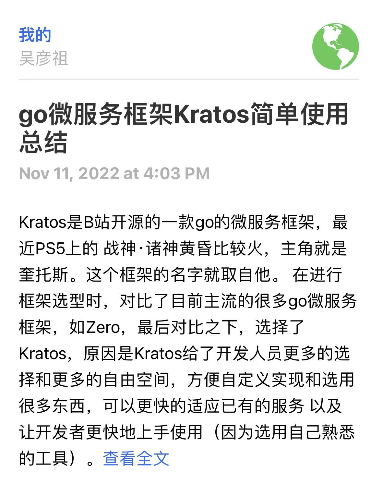
过于简陋,无法直接在 RSS 阅读器软件上进行查看,另外,我临时用 Kotlin 编写的这个功能需要每次调用时重新生成,这点就对这个功能的简单和独立性产生了影响,这件事放了太久,最近进行一次全面的改进。
原始的文章是用 Markdown 编写的。为了方便通过手机或电脑上的 RSS 阅读器查看,我需要将文章内容转换为 HTML 格式。在 Go 语言中,有一个成熟的组件:blackfriday。它能把每段文字用 p 标签标记,用 code 和 pre 标签标记代码块,以及用 h1234 标签标记不同层级的标题。
github.com/PuerkitoBio/goquery
github.com/russross/blackfriday/v2
经过一次生成并查看效果后,我发现有些地方需要改进。例如,图片和文字都是左对齐的,看起来并不美观。另外,非代码块的单引号也会被转化为代码块,导致原本可以在一行显示的内容被拆分为三行。于是我添加了一些附加功能:
func Md2Html(markdown []byte) string {

	// 1. Convert markdown to HTML
	html := blackfriday.Run(markdown)

	// 2. Create a new document from the HTML string
	doc, err := goquery.NewDocumentFromReader(bytes.NewReader(html))
	if err != nil {
	log.Fatal(err)
	}

	// 3. Process all elements to have a max-width of 1300px and text alignment to left
	doc.Find("p, h1, h2, h3, h4, h5, h6, ul, ol, li, table, pre").Each(func(i int, s *goquery.Selection) {
	s.SetAttr("style", "max-width: 1300px; display: block; margin-left: auto; margin-right: auto; text-align: left;")
	})

	// 4. Process the images to be centered and have a max size of 500x500
	doc.Find("img").Each(func(i int, s *goquery.Selection) {
	s.SetAttr("style", "max-width: 500px; max-height: 500px; display: block; margin-left: auto; margin-right: auto;")
	})

	// 5. Process code blocks to be styled like in markdown, and inline code to be bold
	doc.Find("code").Each(func(i int, s *goquery.Selection) {
	if goquery.NodeName(s.Parent()) == "pre" {
	// this is a code block, keep the markdown style
	s.SetAttr("style", "display: block; white-space: pre; border: 1px solid #ccc; padding: 6px 10px; color: #333; background-color: #f9f9f9; border-radius: 3px;")
	} else {
	// this is inline code, replace it with bold text
	s.ReplaceWithHtml("<b>" + s.Text() + "</b>")
	}
	})

	// 6. Get the modified HTML
	modifiedHtml, err := doc.Html()
	if err != nil {
	log.Fatal(err)
	}

	// Replace self-closing tags
	modifiedHtml = strings.Replace(modifiedHtml, "/>", ">", -1)

	return modifiedHtml
}
修改之后,我把生成的 HTML 内容放入 RSS 的 XML 中。XML 内容的生成就是简单的字符串拼接,我写了一个 GenerateFeed 方法来完成:
type Article struct {
	Title string
	Link string
	Id string
	Published time.Time
	Updated time.Time
	Content string
	Summary string
}

func GenerateFeed(articles []Article) string {
	// 对文章按发布日期排序
	sort.Slice(articles, func(i, j int) bool {
	return articles[i].Published.After(articles[j].Published)
	})

	// 生成Feed
	feed := `<feed xmlns="http://www.w3.org/2005/Atom">
	<title>了迹奇有没</title>
	<link href="/feed.xml" rel="self"/>
	<link href="https://whrss.com/"/>
	<updated>` + articles[0].Updated.Format(time.RFC3339Nano) + `</updated>
	<id>https://whrss.com/</id>
	<author>
	<name>whrss</name>
	</author>`

	for _, article := range articles {
	feed += `
	<entry>
	<title>` + article.Title + `</title>
	<link href="` + article.Link + `"/>
	<id>` + article.Id + `</id>
	<published>` + article.Published.Format(time.RFC3339) + `</published>
	<updated>` + article.Updated.Format(time.RFC3339Nano) + `</updated>
	<content type="html"><![CDATA[` + article.Content + `]]></content>
	<summary type="html">` + article.Summary + `</summary>
	</entry>`
	}

	feed += "\n</feed>"
	return feed
}
最后效果确实十分理想,手机上的观看效果不输我的原始站点,很不错~
评论