
我们团队负责的防沉迷上报服务突然在某一天遭遇了内存溢出(OOM)的情况。通过查看 Prometheus 监控数据,我们发现 Goroutines 的数量在中午十二点之后呈现出线性增长趋势,直至晚上十点 OOM 发生,Goroutines 数量骤降为零。如下图所示: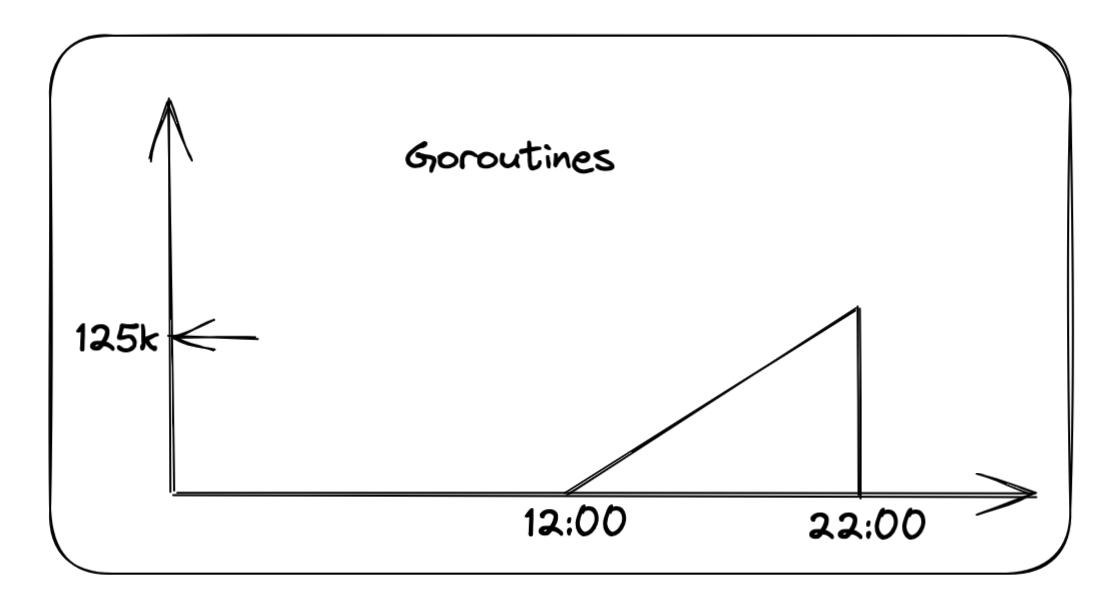
从这个 Goroutine 的创建趋势图中,我们可以推断出服务在中午十二点触发了某个 bug,导致 Goroutine 不断创建,最终引发了内存溢出的问题。
队列实现
在我们的服务中,有一个用于上下线上报的队列。当队列达到一定阈值或指定时间间隔时,会触发读取和上报。以下是队列的具体实现:
package main

import (
    "errors"
    "sync")

type QueueError error

var CapacityExceededError QueueError = QueueError(errors.New("capacity exceeded"))

// Queue 包含信号通知的队列
// 当队列长度大于等于 thresholdSize 时,触发信号,外部可以监听信号
// 当队列长度小于 thresholdSize 时,重置信号状态
type Queue struct {
    items    items
    capacity int
    lock     sync.Mutex
    // 触发信号的阈值大小
    thresholdSize int
    // 信号通知,当队列长度大于等于 thresholdSize 时,触发信号
    processSignal chan bool
    // 是否已经处理过信号
    signalProcessed bool
}

type items []interface{}

// NewQueue 创建新队列, 指定容量和触发信号的阈值大小
func NewQueue(thresholdSize int, capacity int) *Queue {
    q := &Queue{}
    q.processSignal = make(chan bool, 1)
    q.thresholdSize = thresholdSize
    q.capacity = capacity
    // 初始化与 thresholdSize 大小一致的队列
    q.items = make([]interface{}, 0, thresholdSize)
    return q
}

// Put 添加元素到队列
func (q *Queue) Put(item interface{}) error {
    q.lock.Lock()
    defer q.lock.Unlock()
    if q.len() >= q.capacity {
       return CapacityExceededError
    }
    q.items = append(q.items, item)
    if q.len() >= q.thresholdSize {
       q.triggerSignal()
    }
    return nil
}

// Poll 从队列中取出元素, 并返回取出的元素
// 如果队列内部元素小于 num, 则设定 signalProcessed 为 falsefunc (q *Queue) Poll(num int) []interface{} {
    q.lock.Lock()
    defer q.lock.Unlock()
    if q.len() <= num {
       num = q.len()
    }
    result := q.items.get(num)
    if q.len() < q.thresholdSize {
       q.resetSignalState()
    }
    return result
}

// PollAll 返回队列中的所有元素,并清空队列
func (q *Queue) PollAll() []interface{} {
    q.lock.Lock()
    defer q.lock.Unlock()
    if q.len() == 0 {
       return nil
    }
    // 获取所有元素
    allItems := q.items
    q.items = make([]interface{}, 0, q.thresholdSize)
    q.resetSignalState()
    return allItems
}

func (items *items) get(number int) []interface{} {
    returnItems := make([]interface{}, 0, number)
    index := 0
    for i := 0; i < number; i++ {
       if i >= len(*items) {
          break
       }
       returnItems = append(returnItems, (*items)[i])
       (*items)[i] = nil
       index++
    }

    *items = (*items)[index:]
    return returnItems
}

func (q *Queue) triggerSignal() {
    if q.signalProcessed {
       return
    }
    q.processSignal <- true
    q.signalProcessed = true
}

func (q *Queue) resetSignalState() {
    q.signalProcessed = false
}

func (q *Queue) len() int {
    return len(q.items)
}

func (q *Queue) ProcessSignal() <-chan bool {
    return q.processSignal
}
在这个队列中,使用了一个无缓冲的 channel 来记录队列是否达到了阈值,还有一个布尔变量来标记队列是否已经被消费。当队列中的元素数量超过阈值时,channel 和布尔变量协作,通知外部读取队列。
消费过程
在消费过程中,我们使用 timer 和队列信号作为消费信号,持续读取队列。当到达指定的时间间隔或队列长度超过阈值时,进行队列的读取和上报。
// 到达 ReportInterval 或者 batchSize 进行发送
timer := time.NewTimer(w.config.ReportInterval)
defer timer.Stop()
for {
    // 缓存消息,定时发送或者足量发送
    select {
    case <-ctx.Done():
       slog.Info("report stop")
       return
    case <-timer.C:
       ReportMessages(ctx, que)
       timer.Reset(ReportInterval)
    case <-que.ProcessSignal():
       ReportMessages(ctx, que)
       timer.Reset(ReportInterval)
    }
}
在这段代码中:
- 当到达配置的
ReportInterval时间时,计时器timer触发,执行ReportMessages函数消费队列,并重置计时器以等待下一个时间间隔。 - 当队列长度超过阈值时,队列的
ProcessSignal信号触发,同样执行ReportMessages函数消费队列,并重置计时器。 - 如果上下文
ctx被取消,则记录日志并停止报告。
通过这种方式,我们确保了队列可以在定时或达到一定长度时进行消费,保持系统的高效运行。
死锁分析
在队列的实现中,我们使用了锁 (lock) 和无缓冲的信号通道 (channel) 来管理队列状态。这两者都有可能会阻塞,如果它们同时阻塞并互相等待,就会导致死锁。通过观察 Goroutine 的创建趋势图,可以推测出请求在放入队列时发生阻塞,导致 Goroutines 数量不断增加,最终引发内存溢出。
那么,在什么情况下会导致死锁呢?
经过分析,只有一种情况会导致死锁:
- 队列大量写入瞬间到达阈值:当队列中的元素数量瞬间达到阈值时,信号通道 (
channel) 被写入。 - 进入定时器 (
timer) 进行消费:此时,timer触发,消费队列并将flag设置为false,但是信号通道 (channel) 没有被消费。 - 信号通道阻塞:在这种情况下,写入队列操作 (
queue.Put) 会因信号通道阻塞而无法完成。 - 再一次进入定时器:此时不会进入
<-que.ProcessSignal()的 case,而是再次进入timercase,尝试读取队列但获取锁 (lock) 阻塞。 - 互相阻塞:队列的
Put和PollAll操作互相阻塞,最终导致死锁。
总结来说,死锁发生在队列瞬间达到阈值时,信号通道被写入但未被消费,随后定时器再次触发消费操作时,导致队列的 Put 和 PollAll 操作互相阻塞。
死锁原因深入分析
根据代码逻辑,每次执行完 select 语句后都会调用 timer.Reset(ReportInterval) 来重置定时器。因此,理论上不应该两次进入 timer case,因为存在 que.ProcessSignal() 信号量,会优先进入这个 case。然而,经过多次反复检查后,其他情况不可能导致死锁,最终怀疑的焦点集中在 timer.Reset 上。
通过查看 timer.Reset 函数的源码及其注释,发现了几个关键点:
- 只对已停止或已到期的定时器使用:对于通过
NewTimer创建的定时器,应当只在定时器已停止或已到期并且相关通道已清空的情况下调用Reset。这样可以避免定时器重置操作和通道接收操作之间的竞争条件。 - 确保通道已被清空:
- 如果程序已经从
t.C接收到了值,表明定时器已经到期,并且通道已被清空,可以直接调用t.Reset。 - 如果程序尚未从
t.C接收到值,应首先停止定时器:
- 如果程序已经从
  if !t.Stop() {
  	<-t.C  // 清空通道
  }
  t.Reset(d)
此代码片段首先尝试停止定时器,如果定时器已经到期(`t.Stop()` 返回 `false`),则必须从通道中读取以清空通道,避免潜在的死锁或重复接收旧的过期值。
因此,如果定时器已经到达执行时间,需要先读取 timer.C 再执行 Reset 操作,否则 Reset 可能不会生效,导致定时器相继执行两次,从而发生死锁。
根据日志和错误分析,最近版署防沉迷系统“升级”后经常出现超时(time out),导致上报执行时间变长,队列堆积,从而暴露出这个 bug。
总结
在上面的描述中,我们发现了队列和上报逻辑中的两个主要 bug:
- 队列内部的死锁:
put和poll操作可能会导致死锁。 - 错误使用
timer.Reset:timer.Reset的使用方法不正确,可能导致定时器误触发。
此外,队列的设计也存在一些问题,例如多余的 flag 值和对 channel 信号的阻塞处理不当。我们对队列进行了优化,去掉了多余的 flag 值,并改进了 channel 信号处理。以下是优化后的队列代码:
package main

import (
    "errors"
    "sync")

type QueueError error

var CapacityExceededError QueueError = QueueError(errors.New("capacity exceeded"))

// Queue 包含信号通知的队列
// 当队列长度大于等于 thresholdSize 时,触发信号,外部可以监听信号
// 当队列长度小于 thresholdSize 时,重置信号状态
type Queue struct {
    items    items
    capacity int
    lock     sync.Mutex
    // 触发信号的阈值大小
    thresholdSize int
    // 信号通知,当队列长度大于等于 thresholdSize 时,触发信号
    processSignal chan bool
}

type items []interface{}

// NewQueue 创建新队列, 指定容量和触发信号的阈值大小
func NewQueue(thresholdSize int, capacity int) *Queue {
    q := &Queue{}
    q.processSignal = make(chan bool, 1)
    q.thresholdSize = thresholdSize
    q.capacity = capacity
    // 初始化与 thresholdSize 大小一致的队列
    q.items = make([]interface{}, 0, thresholdSize)
    return q
}

// Put 添加元素到队列
func (q *Queue) Put(item interface{}) error {
    q.lock.Lock()
    defer q.lock.Unlock()
    if q.len() >= q.capacity {
       return CapacityExceededError
    }
    q.items = append(q.items, item)
    if q.len() >= q.thresholdSize {
       q.triggerSignal()
    }
    return nil
}

// Poll 从队列中取出元素, 并返回取出的元素
// 如果队列内部元素小于 num, 则设定 signalProcessed 为 falsefunc (q *Queue) Poll(num int) []interface{} {
    q.lock.Lock()
    defer q.lock.Unlock()
    if q.len() <= num {
       num = q.len()
    }
    result := q.items.get(num)
    if q.len() < q.thresholdSize {
       q.resetSignal()
    }
    return result
}

// PollAll 返回队列中的所有元素,并清空队列
func (q *Queue) PollAll() []interface{} {
    q.lock.Lock()
    defer q.lock.Unlock()
    if q.len() == 0 {
       return nil
    }
    // 获取所有元素
    allItems := q.items
    q.items = make([]interface{}, 0, q.thresholdSize)
    if len(allItems) >= q.thresholdSize {
       q.resetSignal()
    }
    return allItems
}

func (q *Queue) triggerSignal() {
    select {
    case q.processSignal <- true:
    default:
    }
}

func (q *Queue) resetSignal() {
    select {
    case <-q.processSignal:
    default:
    }
}

func (items *items) get(number int) []interface{} {
    returnItems := make([]interface{}, 0, number)
    index := 0
    for i := 0; i < number; i++ {
       if i >= len(*items) {
          break
       }
       returnItems = append(returnItems, (*items)[i])
       (*items)[i] = nil
       index++
    }

    *items = (*items)[index:]
    return returnItems
}

func (q *Queue) len() int {
    return len(q.items)
}

func (q *Queue) ThresholdChan() <-chan bool {
    return q.processSignal
}
同时,我们对 timer.Reset 的使用进行了修改,以确保符合预期:
case <-que.ThresholdChan():
    ReportMessages(ctx, que)
    if !timer.Stop() {
       <-timer.C
    }
    timer.Reset(ReportInterval)
这是我第一次在 Go 语言中手写死锁代码,这次经历让我学习到了很多。虽然防沉迷上报这个业务价值并不高,影响很小,但通过这次优化,我对使用 channel 的方式有了更深刻的理解,也避免了以后可能会遇到的的坑。
2024-08-15 更新:
在 golang 1.23 中,对 Timer 和 Ticker 的行为做了修改:
Second, the timer channel associated with a `Timer` or `Ticker` is now unbuffered, with capacity 0. The main effect of this change is that Go now guarantees that for any call to a `Reset` or `Stop` method, no stale values prepared before that call will be sent or received after the call.
与定时器或计时器关联的定时器通道现在没有缓冲区,容量为 0。此更改的主要影响是 Go 现在可以保证对任何调用 Reset 或 Stop 方法的调用,在调用之前准备的过时值在调用之后不会被发送或接收。
如果你也有同样的问题,可以升级到 golang 1.23~
评论